
CloudFilter: Platform-Agnostic Email Filtering by Mailprotector
CloudFilter by Mailprotector is a platform-agnostic secure email gateway that provides comprehensive inbound and outbound email protection through a continuously trained multi-layer threat detection engine, offering tunable spam filtering categories and precise control for administrators to effectively block spam and threats without impeding legitimate emails across any environment where MX record control is available.

One solution. Every environment.
CloudFilter is a secure email gateway built to deliver full inbound and outbound protection anywhere you have MX record control.
The flexibility to protect any environment, your way.
Threat Detection
Every message evaluated from every angle
A continuously trained detection engine evaluates every message across multiple layers and generates a probabilistic threat score. Nothing slips through on a single missed signal.

Obvious junk
SCORE:640
DECISION:Quarantine spam
No Reverse DNS
The server that relayed the message did not have a reverse DNS record.
SCORE 40
Spamcop
This message came from an IP on the Spamcop DNS-based Blocking List.
SCORE 0
Spamhaus Block List
This message came from an IP that is on the Spamhaus Block List.
SCORE 200
SPF Soft Fail
The SPF record has designated the host as NOT being allowed to send but is in transition.
SCORE 200
Snake Oil
Online pharmacies, hgh, viagra, weight loss, no prescription needed.
SCORE 200
DMARC Not Available
Domain in From header has no DMARC policy or From header is missing.
SCORE 0
Promotions
Questionable 600Good-38294
Obv. Spam
Questionable 600Good-204707
Spam
Questionable 600Good0
Poss. Spam
Questionable 600Good0
Impersonation
Questionable 600Good0
Poss. Impersonation
Questionable 600Good0
Precise Filtering
Stop spam without blocking legitimate email
Tunable spam categories give administrators precise control over what gets quarantined, what gets flagged, and what gets through—so you can meet diverse client needs with ease.
Admin Visibility and Control
Deep admin control that doesn't take an expert to run
Set filtering policies at any level—from your entire client base down to individual users—and surface mail flow problems before a client has to tell you about them.
PARTNERCUSTOMERSDOMAINSUSERS
Your message is being delivered.
Always allow email from this sender to your inbox?
NoYes
Hello Acme Corp
Here's your 2PM email review for Monday, March 30th.
12 messages were held since your last review 3 days ago.
(sorted by quality)View all 24 held messages
Alex Chen[email protected]
3/16/2026
SEO Growth Plan
Deliver
Delivered Block Sender
Junk
Cloud Storage[email protected]
3/17/2026
Uploads Paused: Storage Full
Deliver
Delivered
Block Sender
Junk
Mark Davis[email protected]
3/19/2026
Website Redesign & Development Services
Deliver
Delivered Block Sender
Junk
Sarah Thompson via BizConnect[email protected]
3/20/2026
Acme Corporation
Deliver
Delivered Block Sender
Junk
James Wilson[email protected]
3/21/2026
Clean Office Goals? Let's Start with a Free Visit
Deliver
Delivered Block Sender
Junk
Payment Remittance[email protected]
3/16/2026
AP_EFT/ACH deposit ~ 3/16/2026 10:27:06 a.m.
Deliver
Delivered Block Sender
1
Junk
1–6 of 12
You're all caught up. Nice!
Your next review is scheduled for Today at 5:00 PM.
In the last 14 days
25%
of the email sent
to you was junk
33
unwanted emails
were held
3 mins
of inbox cleanup
time was saved
View all held messages
Message Review
Safe message review without the back and forth
When messages are held, users are notified on a customizable schedule. A safe preview and one-click release or block means they can handle it themselves—no ticket required.
SafeSend™
Take control of what leaves your clients' environments
Bundled with CloudFilter, SafeSend adds advanced outbound content controls and compliance tools. Sensitive data stays in, and your clients' sending habits stay visible.
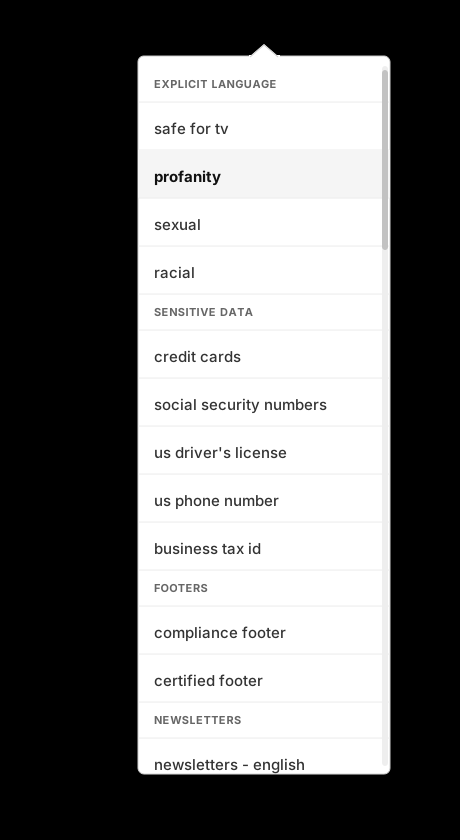
DLP rule templates
Pre-built templates make it fast to create rules for risky content types. Admins have full control over what happens when one is triggered.
Instant blocking notifications
When outgoing emails are blocked for policy violations, the sender is immediately notified that the message was held and why.
Attachment Blocking
Outbound attachments can be automatically blocked or encrypted based on admin-defined policies so sensitive data never leaves unprotected.
Everything you need. Nothing you don't.
CloudFilter covers every angle of email security—inbound, outbound, admin control, and unmatched flexibility—for any environment you manage.
Platform Agnostic
Works with any email platform—Microsoft, Google, on-prem, or mixed—so you can better meet diverse client needs.
Best-in-Class Console
A mobile-first admin console with the depth of control other gateways simply can't match without feature bloat.
Full Audit Trail
Full visibility into every admin action for accountability when multiple techs are managing the same environments.
Impersonation Detection
Uses clients' known contacts and domains to automatically identify impersonation attempts across multiple attack types.
DMARC Enforcement
Precise control over how DMARC failures are handled with customizable result types to match policy requirements.
Outbound, Built In
Built-in outbound filtering detects compromised accounts and stops spam and viruses before they damage reputation.
Complete your stack with more from Mailprotector®
 \
Email Archiving\
\
Immutable email archiving with configurable retention that keeps every message secure, searchable, and compliant.\
Learn more
\
Email Archiving\
\
Immutable email archiving with configurable retention that keeps every message secure, searchable, and compliant.\
Learn more  \
Email Continuity\
\
Automatically holds and delivers email when a client's server goes down, so email keeps flowing without interruption.\
Learn more
\
Email Continuity\
\
Automatically holds and delivers email when a client's server goes down, so email keeps flowing without interruption.\
Learn more
From the Trenches
Easy to run. Hard to beat.
The false positives are practically nil. I can't remember the last time I had to release something. It's just always been right.

Zac Paulson
ABM Technology Group
Don't let the simple customer interface fool you. The solution is a powerhouse of security and options on the backend for the admin.

Matt Hoffman
Frontline Technology
CloudFilter replaced a tool that created more problems than it solved. The cross-platform coverage pays for itself in efficiency gains.

Jason Etheridge
Logic Speak
Frequently Asked Questions
What platforms does CloudFilter support?
CloudFilter protects any platform where you have MX record control—Microsoft 365, Google Workspace, on-prem servers, hosted environments, and POP/IMAP. That flexibility makes it the right fit for MSPs managing diverse client environments.
How does CloudFilter evaluate and filter email?
Every message is scored by multiple detection tools, each contributing a weighted score toward an overall threat assessment. The default quarantine threshold is 200 points. Messages that cross it are held outside the mailbox for review. Sensitivity is fully tunable at any level, from your entire client base down to individual users, so filtering behavior matches each client’s needs without rebuilding policy from scratch for every domain.
What if a legitimate email gets quarantined?
CloudFilter’s probabilistic detection is designed to minimize false positives, but when one does occur, the process is straightforward. Users can safely preview any held message before deciding what to do, and if admin permissions allow, deliver or block with one click.
For admins, every quarantined message includes a full breakdown: reasons held, sending source data, and geographic origin. And if a pattern emerges, filtering sensitivity is fully tunable at every level so the fix is a configuration change, not a recurring task.
How does CloudFilter stop advanced threats?
CloudFilter combines open source and proprietary technology—machine learning, heuristic analysis, URL and domain reputation checks, multiple anti-virus and malware engines, and more—into a sophisticated detection system that identifies nuance other filters miss. Every message is evaluated across multiple layers simultaneously, generating a probabilistic threat score that accounts for signals other tools treat in isolation.
Automated impersonation detection combines organizational insights and behavioral analysis to identify impersonation attempts in real time. A confidence level and risk score are assigned to every flagged message, with controls for administrators to tune sensitivity down to the individual user. To help prevent phishing and spoofing attempts, CloudFilter provides complete DMARC enforcement with the ability to customize behavior.
How long does setup take?
For most partners, CloudFilter is up and running in 5–15 minutes with no email outage during the transition. Setup follows four steps: add users, set the inbound mail destination, verify the domain via TXT record, and update MX records. The recommended approach is to add Mailprotector’s MX records before removing the existing ones. This starts DNS propagation in the correct order and ensures no email is lost in the transition.
How does user management work across multiple client environments?
User Sync is CloudFilter’s automated user management feature. It connects to Microsoft 365, Google Workspace, or any LDAP/Active Directory source to pull users over automatically. And because it inherits account classifications from the source, distribution lists, shared mailboxes, and equipment accounts are excluded from billing automatically. User Sync also feeds CloudFilter’s impersonation detection layer with organizational data, which is what makes automated impersonation detection possible.
What partner training is available?
One-on-one new partner training sessions are available on request at no additional cost. A recorded training video is also available in the help center for self-paced onboarding. Partners receive free NFR licenses to deploy and test CloudFilter themselves before rolling it out to clients.
What does SafeSend add to outbound protection?
CloudFilter includes core outbound filtering, and SafeSend is bundled with it to add advanced content controls and compliance tools on top.
SafeSend gives administrators visibility into the outbound quarantine and the ability to define what content is permitted to leave using pre-built lexicons or custom rules. When a rule is triggered, senders are notified immediately and can self-release the message with one click if permissions allow. For organizations with more stringent requirements, SafeSend can automatically trigger Bracket® encryption on sensitive outbound content, so data is protected in transit rather than simply stopped.
Is CloudFilter Mailprotector's only email filtering product?
No. CloudFilter is Mailprotector’s platform-agnostic gateway solution for MSPs managing a diverse mix of client environments. For MSPs who primarily support organizations on Microsoft 365, Mailprotector also offers Shield™, a zero trust email security solution that combines our secure email gateway with a patented API integration for full edge-to-inbox visibility and control.
Ready to see CloudFilter in action?
Get a personalized walkthrough and bring your questions. We'd love to show you filtering that actually works the way you need it to.